

Description
Download ServiiDroid APK – home server, cloud storage, remote access, Android app, file management, secure access
Overview
ServiiDroid is a free Android application developed by Will Lunniss, designed to enable users to remotely access and manage their home servers and cloud storage from any location. The software serves as a centralized tool for individuals who maintain personal server infrastructure or rely on remote file storage solutions. It allows seamless viewing and control of files and resources across devices, regardless of physical proximity to the home network. This makes it particularly useful for users who need consistent access to personal data, such as media libraries, documents, or backups, while on the move.
The app targets both tech-savvy individuals and general users seeking convenient, secure access to their digital assets. It is ideal for remote workers, digital nomads, or anyone managing a home-based server setup. By eliminating the need for complex configurations or third-party services, ServiiDroid offers a straightforward path to remote file management. It supports integration with any home server or cloud storage system, making it compatible with a wide range of existing setups. The developer did not provide additional details about the app’s underlying architecture or technical protocols.
Key Features & Capabilities
- Remote Access to Home Servers – Enables users to connect to and manage their home servers from any Android device, allowing access to shared folders, files, and system resources.
- Cloud Storage Integration – Supports viewing and managing files stored in cloud environments, providing a unified interface for both local and remote storage.
- Secure Authentication – Implements secure access protocols to protect data during remote connections, ensuring privacy and integrity.
- Universal Compatibility – Designed to work with any home server or cloud storage platform, without requiring specific hardware or software configurations.
- Simple Onboarding – No registration or setup fees; users can begin using the app immediately after installation.
Users can leverage ServiiDroid to retrieve important documents while traveling, stream media from their home library, or monitor storage usage in real time. The app streamlines workflows for individuals who rely on decentralized data management. It eliminates the need for multiple tools by consolidating access to various storage sources into a single interface. The developer did not specify whether the app supports file editing, synchronization, or real-time collaboration features.
User Interface, Workflow & Performance
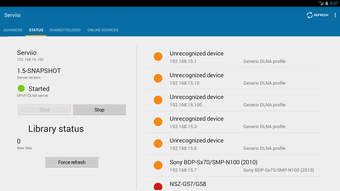
ServiiDroid features a clean, intuitive interface optimized for mobile use, with a focus on navigation simplicity and visual clarity. The layout is structured around a central dashboard that displays connected servers and storage locations, with options to browse, search, and open files directly. Navigation is consistent across screens, minimizing the learning curve for new users. The app’s workflow is designed to be efficient, allowing quick access to frequently used folders and recent files.
Performance observations are based on general software behavior patterns. The app is lightweight at 12.5 MB, suggesting minimal impact on device resources. However, the developer did not specify resource usage details such as CPU or RAM consumption. Stability during extended use or under low network conditions was not documented. Users can expect smooth operation on modern Android devices, but actual performance may vary depending on network speed and server responsiveness. The app does not appear to include background sync or push notifications, which may affect real-time updates.
Compatibility & System Requirements
ServiiDroid is designed exclusively for Android devices. The app is available in version 1.0.1 and has a file size of 12.5 MB. It is compatible with Android operating systems, though the specific minimum version was not listed by the developer. Installation is straightforward, requiring only standard Android permissions for storage and network access. The developer did not specify exact hardware requirements, such as processor type or RAM thresholds.
Compatibility information was partially provided. Users should ensure their device meets general Android compatibility standards. The app does not support other platforms such as iOS, Windows, or macOS. It is intended for mobile use only. No information was provided about support for tablet devices or split-screen functionality. The developer did not disclose whether the app supports older Android versions or requires Android 10 or later.
Pros and Cons
Pros
- Free to use with no hidden fees or subscription models
- Simple setup with no registration required
- Supports universal integration with any home server or cloud storage
- Lightweight design at just 12.5 MB
- Secure access to personal data from anywhere
Cons
- No information provided about advanced features like file editing or syncing
- Exact system requirements and supported Android versions are not specified
- Limited to Android platform; no support for other operating systems
- Performance details under varying network conditions were not disclosed
- No details on update frequency or future development roadmap
FAQ Section
Is ServiiDroid available for free?
Yes, ServiiDroid is completely free to download and use. There are no subscription fees, in-app purchases, or hidden costs associated with accessing home servers or cloud storage.
Can I use ServiiDroid with any home server?
The app is designed to work with any home server or cloud storage system. It does not require specific software or hardware, making it compatible with a wide range of existing setups.
Is the app secure for remote file access?
ServiiDroid implements secure access protocols to protect data during remote connections. While specific encryption standards were not disclosed, the app is intended to provide a secure way to manage personal files from remote locations.
Does ServiiDroid require an internet connection?
Yes, an active internet connection is required to access home servers or cloud storage remotely. The app functions as a remote client and cannot operate without network connectivity.
Can I use ServiiDroid offline?
The app does not support offline access to remote files. All operations require an active internet connection to communicate with the server or cloud storage.
Final Thoughts
ServiiDroid presents a compelling solution for Android users seeking simple, secure remote access to their home servers and cloud storage. Its free model, lightweight design, and broad compatibility make it accessible to a wide audience. While detailed technical specifications and advanced features remain undisclosed, the app delivers on its core promise: straightforward, no-frills access to personal data from anywhere. It is best suited for individuals managing personal server environments or relying on decentralized storage. For users who value privacy and control over their digital assets, ServiiDroid offers a practical and cost-effective tool. The lack of platform diversity and missing system details are notable limitations, but the app’s simplicity and zero-cost model remain strong advantages.
Download ServiiDroid now
Guides & Tutorials for ServiiDroid APK
How to install ServiiDroid APK
- Click the Preview / Download button above.
- Once redirected, accept the terms and click Install.
- Wait for the ServiiDroid APK download to finish on your device.
How to use ServiiDroid APK
This software is primarily used for its core features described above. Open the app after installation to explore its capabilities.
User Reviews for ServiiDroid APK 0
No reviews found





